
Back in March 2021 I wrote about building a resilient Work from Home network using a consumer WAN load balancer (the trusty TP-Link TL-ER5120) to aggregate multiple WAN links: Fibre, ADSL, and 4G, into one resilient pipe for the home office.
That setup served me well for a long time. But consumer load balancers have ceilings: limited visibility, clunky failover logic, no real firewall depth, and zero flexibility if you want to do anything beyond “spread traffic across WANs.” Since then I’ve moved my whole home network over to OPNsense, running on repurposed PC hardware, and honestly, I’m never going back.
This post is the spiritual sequel to that 2021 article: same goal (resilient multi-WAN internet for a WFH setup), same “why,” but a completely different, and far more capable, way of getting there.
Why replace a purpose-built load balancer with a router OS?
The TL-ER5120 and boxes like it are appliances: fixed function, fixed limits. OPNsense is a full firewall/router operating system, which means multi-WAN load balancing and failover is just one of the things it does, alongside:
- Real stateful firewalling and VLAN segmentation
- Native multi-WAN with policy-based routing (not just round-robin)
- Gateway monitoring that actually detects a degraded link, not just a dead one
- VPN (WireGuard/OpenVPN/IPsec) for site-to-site or remote access
- A huge plugin ecosystem (IDS/IPS, DNS filtering, traffic shaping, etc.)
In short: the 2021 setup solved “how do I not lose internet.” OPNsense solves that and gives me a proper platform to keep building on.
High Level Network Design
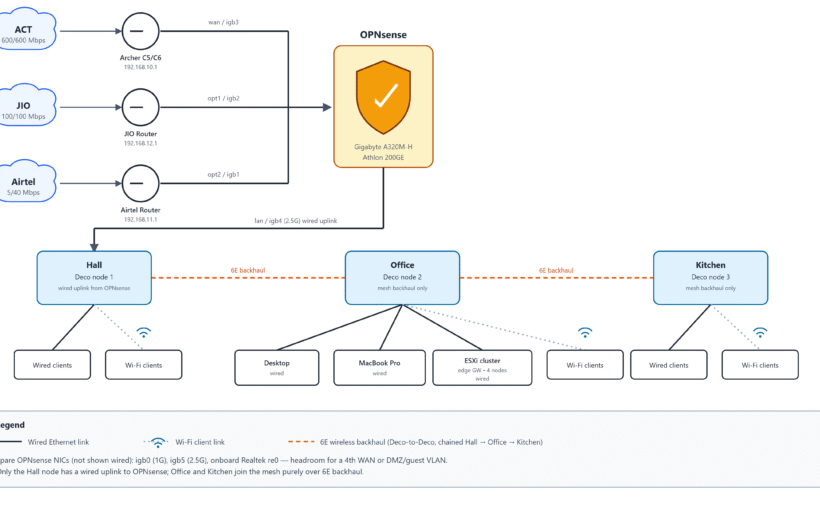
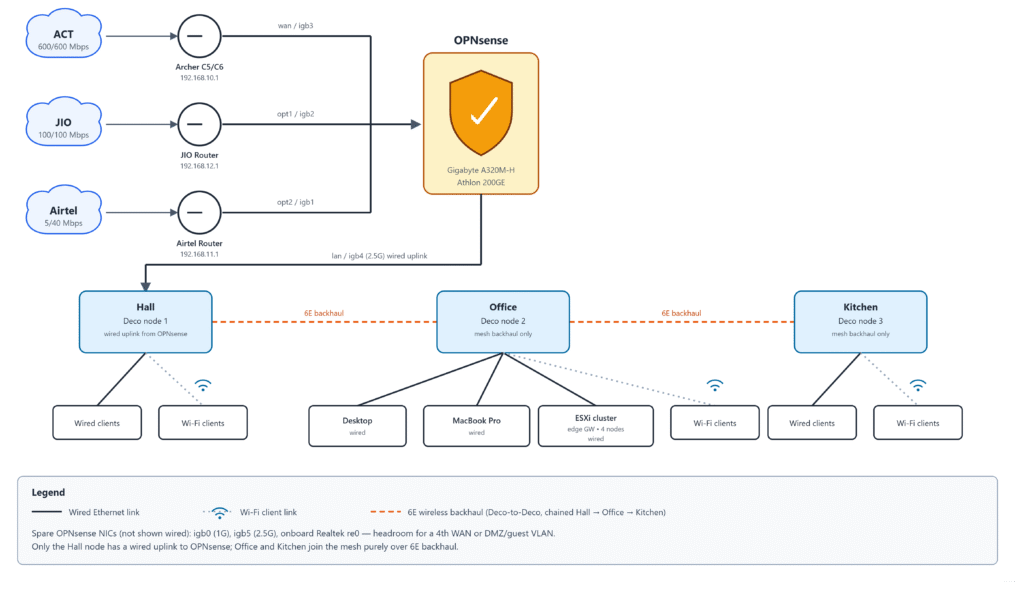
Three ISPs, each terminating on its own ISP-owned router, each on its own /24 network, feeding into OPNsense, which does the actual multi-WAN load balancing and failover:
- ACT: terminates on an ISP-owned Archer C5/C6, gateway 192.168.10.1
- JIO: terminates on an ISP-owned proprietary router, gateway 192.168.12.1
- Airtel: terminates on an ISP-owned proprietary router, gateway 192.168.11.1
None of the ISP-side routers have been touched beyond changing their LAN-side IP to fit each /24 network. All the real work happens downstream, in OPNsense.
Investments
The nice thing about this approach: if you already did the 2021-style setup, you’re not throwing much away. You’re really just replacing the dedicated load balancer with a general-purpose box running OPNsense.
To implement the above network you need:
- ISP modems: same as before, one per WAN link (Fibre/FTTH ONT, ADSL modem, 4G/5G modem). Provided by your ISPs or bought separately, nothing new here.
- A box to run OPNsense on: this is the one real change from the original list. Options range from:
- Repurposed desktop/mini-PC with a couple of spare NICs (what I’m running)
- Purpose-built appliances like Protectli Vault or Qotom mini-PCs if you’d rather buy new
- A multi-NIC card added to an old PC if it’s short on ports
- Wifi mesh system or AP: same as before; OPNsense handles routing, and your Wifi hardware just needs to run in AP mode. A managed switch is optional here too, only needed if your AP has fewer LAN ports than devices you want wired, or you want VLAN segmentation downstream of OPNsense.
So really, the shopping list shrinks compared to 2021, you’re not buying a dedicated load balancer at all, you’re repurposing hardware you likely already have.
My Setup
I’m currently running OPNsense on a self-assembled PC, proof that you don’t need fancy dedicated appliance hardware to get enterprise-grade multi-WAN resilience at home. Here’s exactly what’s under the hood:
Hardware
- Motherboard: Gigabyte A320M-H
- CPU: AMD Athlon 200GE (2 cores / 4 threads, Radeon Vega Graphics)
- RAM: 14 GB
- Onboard NIC: 1x Realtek (re0)
- Add-in NIC: half-height PCIe 4-port Intel card, 1G (igb0 to igb3)
- Add-in NIC: half-height PCIe 2-port Intel card, 2.5G (igb4 to igb5)
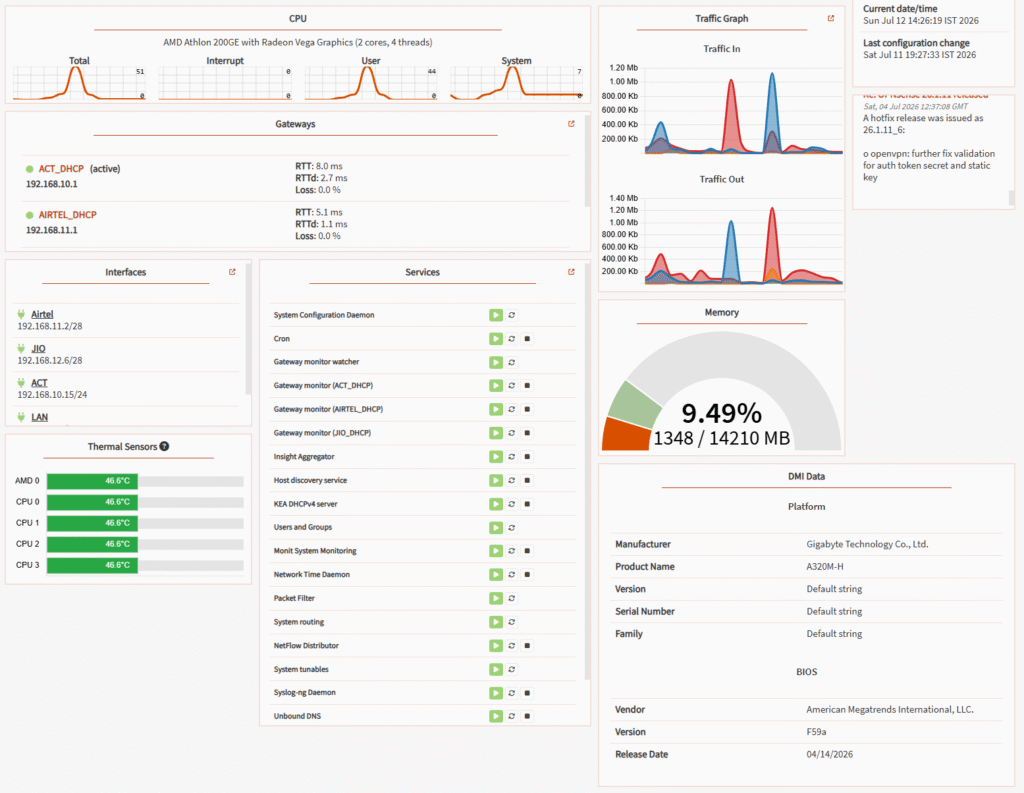
Here’s the live OPNsense dashboard showing the CPU, gateways, interfaces, memory, and system info at a glance:
Interface assignments
| Interface | Identifier | Device | Speed |
|---|---|---|---|
| ACT (WAN) | wan | igb3 | 1G |
| Airtel | opt2 | igb1 | 1G |
| JIO | opt1 | igb2 | 1G |
| LAN | lan | igb4 | 2.5G |
And the interface assignment screen itself, showing which physical NIC maps to which role:
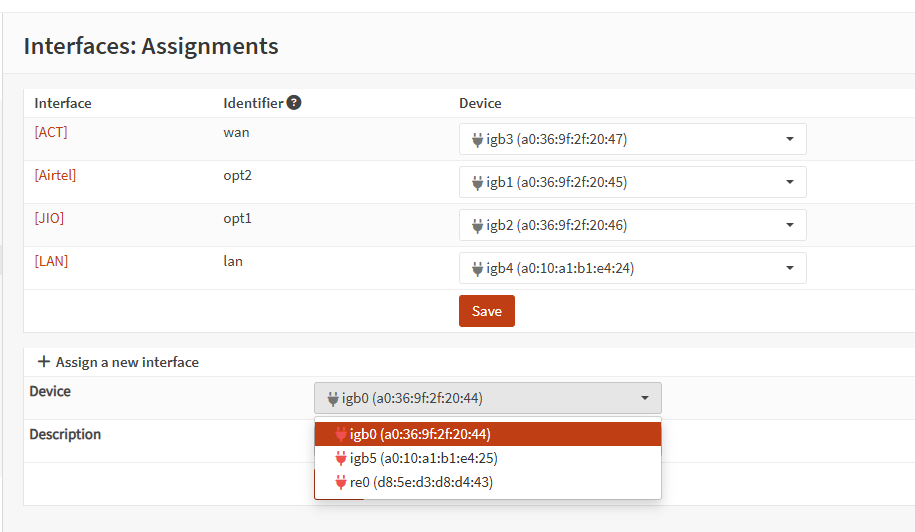
That leaves igb0 (1G), igb5 (2.5G), and the onboard Realtek (re0) spare: headroom for a 4th WAN down the line, or a dedicated DMZ/guest VLAN interface. LAN is on the the 2.5G port. Hence, no bottleneck between OPNsense and the Deco mesh, even when all three WANs are pushing traffic at once.
ISPs (same three-provider lineup as the original 2021 post, just a different box doing the balancing now, and a lot more bandwidth)
- ACT: 600 Mbps up / 600 Mbps down
- JIO: 100 Mbps up / 100 Mbps down
- Airtel: 5 Mbps up / 40 Mbps down
Wifi
No managed switch in the middle this time. OPNsense’s LAN port connects directly into a TP-Link Deco XE75 Pro, running in AP mode across 3 mesh nodes. The XE75 Pro’s 2.5 Gbps port takes the LAN uplink from OPNsense, and the 6E band is reserved purely for wireless backhaul between the mesh nodes rather than client traffic, keeping backhaul off the same spectrum clients use.
Does multi-WAN failover and load balancing work?
Same honest answer as 2021: it depends on what you’re doing.
- Failover: yes, cleanly. OPNsense’s gateway monitoring pings out on each WAN continuously, and when a link goes down (or gets flaky enough to breach your thresholds), it reroutes traffic automatically. This is a genuine improvement over the TL-ER5120 days, you get real-time gateway state and logs instead of a black box.
- Load balancing across a single session: still no, for the same fundamental reason as before: a single TCP session rides one path. Multi-session workloads (multiple downloads, multiple devices, video calls plus browsing plus backups running together) do spread nicely across links.
Here’s a few consecutive speed tests from Bangalore, run over the aggregated multi-WAN link:
| Date/Time | Ping | Download | Upload |
|---|---|---|---|
| 07/12/2026 2:38 PM | 7 ms | 712.75 Mbps | 788.26 Mbps |
| 07/12/2026 2:39 PM | 12 ms | 789.52 Mbps | 17.05 Mbps |
| 07/12/2026 2:40 PM | 11 ms | 752.58 Mbps | 459.71 Mbps |
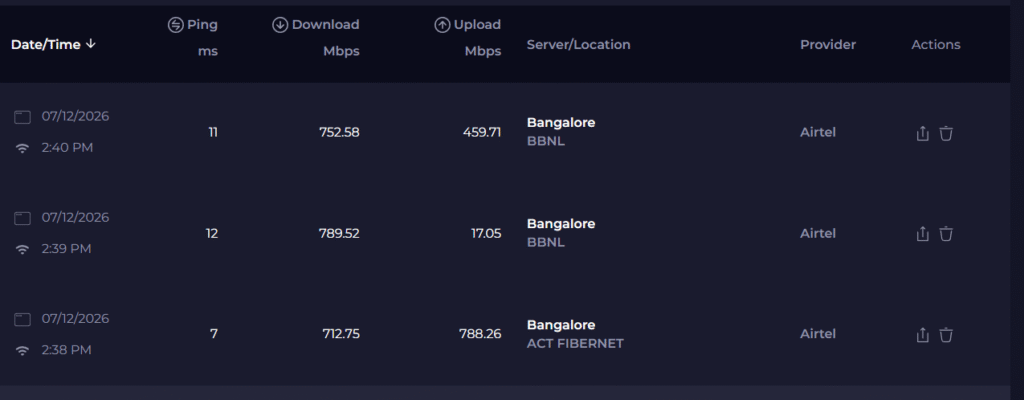
Download consistently lands in the 712 to 789 Mbps range, right in line with the combined ceiling of ACT (600) + JIO (100) + Airtel (40) = 740 Mbps down. Upload bounces around more (17 to 788 Mbps) since it depends heavily on which sessions get load-balanced onto which link at that moment, and Airtel’s upload is capped at just 5 Mbps.
A Cloudflare speed test tells the same story from a different angle: 472 Mbps down / 460 Mbps up, 0% packet loss, and network quality scores of Great for video streaming, Great for online gaming, and Good for video chatting. Latency sat at 46.8 ms with jitter around 63.5 ms, a bit higher than the Ookla numbers above, which makes sense given the test path routes through Chennai rather than Bangalore.
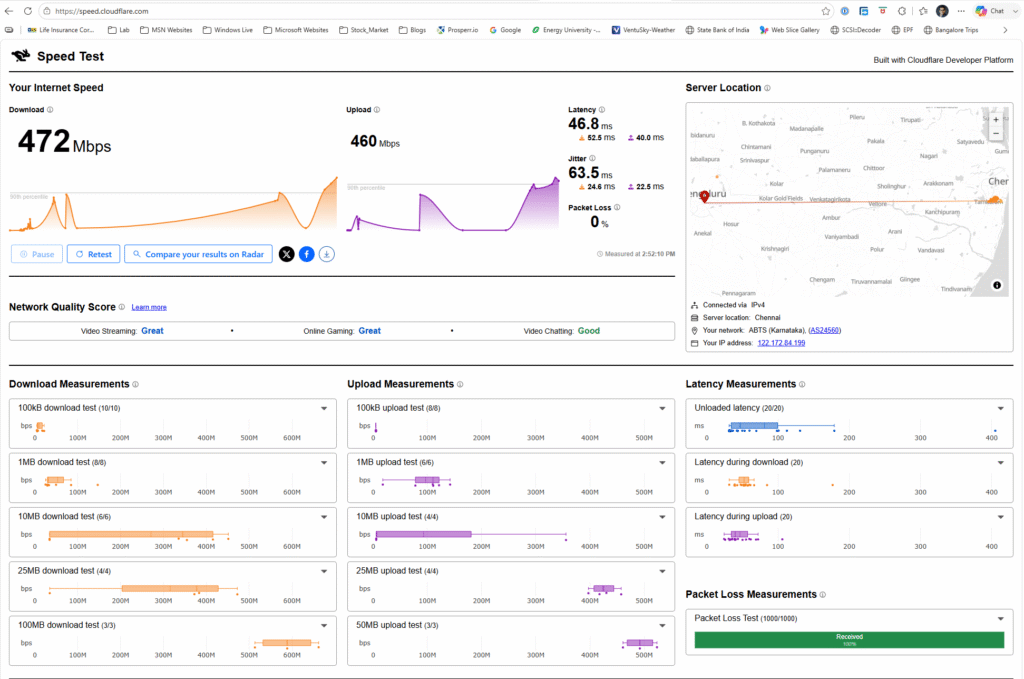
Same conclusion as 2021, just with much bigger numbers: multi-session traffic genuinely aggregates across the WANs, single-session traffic is still bound to whichever one link it lands on.
What’s next
The 2021 post ended with “stay tuned for installation and configuration,” and true to form, same here. In the next post I’ll walk through the actual OPNsense config: setting up multiple WAN interfaces, gateway groups for failover vs. load balancing, and the policy-based routing rules that decide which traffic goes where.

Leave a Reply